During the local setup, a user is automatically configured for you. You can use the following credentials to access the dashboard.On the landing page, click the Sign Up button. Enter your email and set a strong password, then click Sign Up.This process will:
Create a user with the provided email address
Automatically create and tag a merchant account to the user
To view your profile and account information, click your email address at the bottom of the left navigation bar.
Pesaswap Control Center gives you full control over how and where your payments are routed.Navigate to Workflow → Routing from the left nav bar to access the Smart Routing module.By default, a priority-based routing based on the processor created time (first connected processor with highest priority) is enabled for you. This also acts as your fallback routing - which means if all else fails, routing will follow this priority.Currently, you can configure two types of routing with more on the way:
A priority-based routing system is enabled by default. The first connected processor has the highest priority and acts as a fallback in case others fail.
1. Volume-Based RoutingAssign percentage-based volumes to each connected processor. Pesaswap will distribute traffic to maintain the configured ratio.As the name suggests, this routing is based on the volume provided. You can assign percentage volumes that needs to be processed with the connected processors and Pesaswap will route in a way to ensure that the volume distribution is maintainedExample:
70% to Processor A
30% to Processor B
2. Rule-Based RoutingRule based routing gives you finer control over payment routing. It exposes payment parameters like amount, payment_method, card_type etc. with which you can configure multiple rules. Rule based routing also provides an option to enable default processors through which the routing will happen in case the rule fails.Gain granular control by defining custom rules based on payment attributes like:
amount
payment_method
card_type
… and more
You can also configure default processors to fall back on if no rules match.
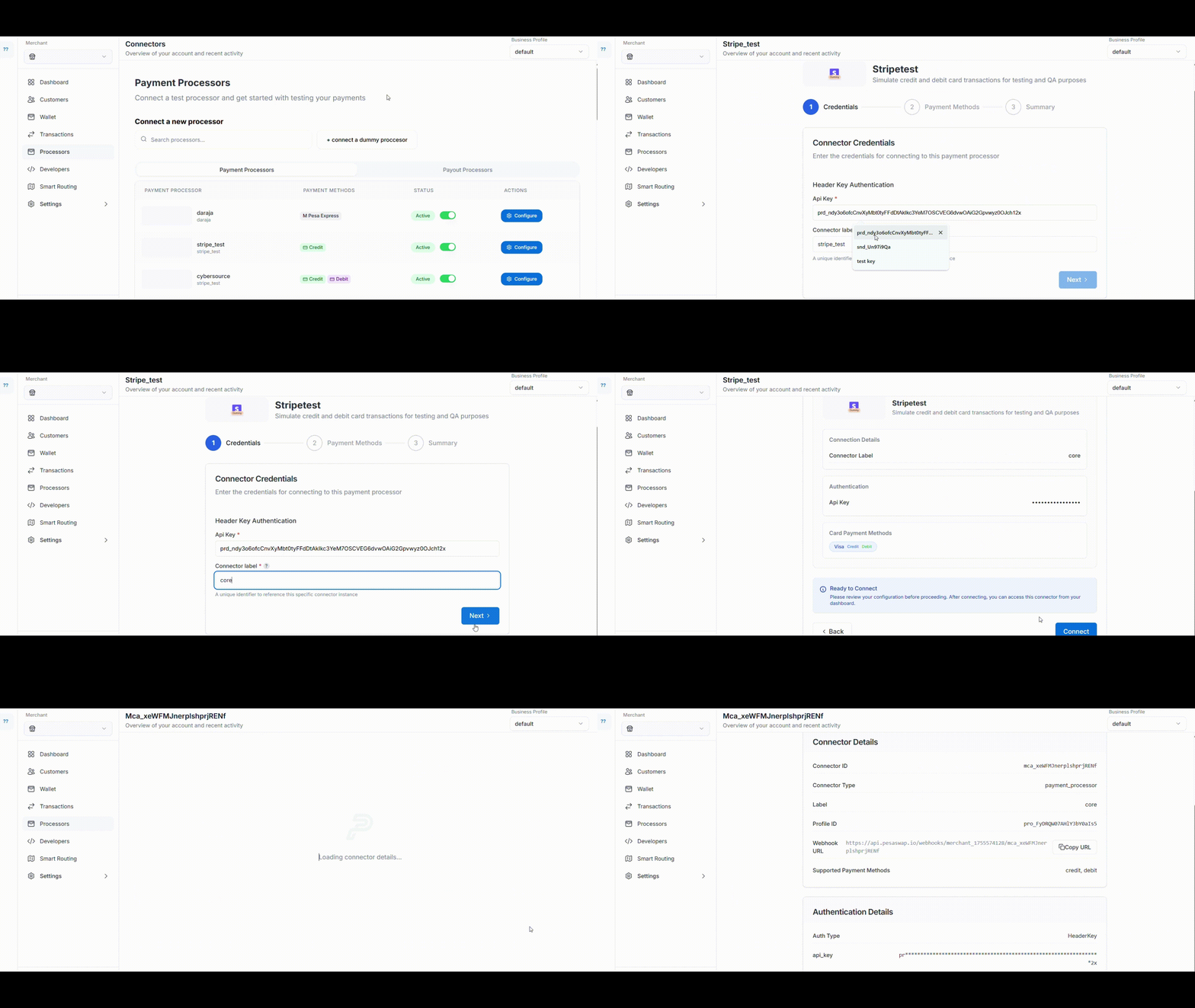
{"docsConfig":{"theme":"mint","$schema":"https://mintlify.com/docs.json","name":"Pesaswap","description":"The complete digital payments platform for businesses of all sizes. Accept payments, manage transactions, and scale your business with Pesaswap - your best option for handling digital payments seamlessly.","colors":{"primary":"#02555B","light":"#2A7A7F","dark":"#013E42"},"logo":{"light":"https://mintcdn.com/pesaswap/gF_mzxFkI4qLgyPO/logo/light.svg?fit=max\u0026auto=format\u0026n=gF_mzxFkI4qLgyPO\u0026q=85\u0026s=3ab49bf4de03976de57a8f434e021b91","dark":"https://mintcdn.com/pesaswap/gF_mzxFkI4qLgyPO/logo/dark.svg?fit=max\u0026auto=format\u0026n=gF_mzxFkI4qLgyPO\u0026q=85\u0026s=da8704c755b4bdd989f354eafa16683c","href":"https://pesaswap.io"},"favicon":"https://mintcdn.com/pesaswap/9QnEDG_16mHRPjKR/favicon.png?fit=max\u0026auto=format\u0026n=9QnEDG_16mHRPjKR\u0026q=85\u0026s=d0c620d74c2cf12df449218d52c6b24d","api":{"openapi":["openapi_spec.json"],"playground":{"display":"simple"},"examples":{"languages":["curl","javascript","python","php"]},"mdx":{"auth":{"method":"bearer"},"server":"https://api.pesaswap.io"}},"background":{"decoration":"grid","color":{"light":"#F5FFFE","dark":"#1A2E2F"}},"navbar":{"links":[{"href":"mailto:support@pesaswap.com","label":"Support"}],"primary":{"type":"button","label":"Dashboard","href":"https://app.pesaswap.io"}},"search":{"prompt":"Search Pesaswap documentation..."},"fonts":{"heading":{"family":"Inter","weight":400},"body":{"family":"Inter","weight":400}},"icons":{"library":"lucide"},"styling":{"codeblocks":"system","latex":false},"navigation":{"pages":[]}},"deployment":{"deploymentMetadataValue":{"subdomain":"pesaswap","hasAudioNarration":false,"actualSubdomain":"pesaswap","customDomains":["docs.pesaswap.io"],"gitSource":{"type":"github","owner":"pesaswap","repo":"pesaswap-api","deployBranch":"mpesa","contentDirectory":"api-reference","isPrivate":true,"mountPath":"","label":""},"chroma":{"liveDeploymentHistoryId":"6ace510299d09ae5ef400572","collectionId":"1916047d-19bd-4e00-a2d8-5b016a915ce8","schemaVersion":"v3","latestBuiltDeploymentHistoryId":"6ace510299d09ae5ef400572"},"entitlements":{},"buildId":"6ace510299d09ae5ef400572","clientVersion":"0.0.3879","searchFilterCounts":[{"language":"default","tag":"Explore","count":75},{"language":"default","tag":"API Reference","count":57},{"language":"default","tag":"Explore Pesaswap","count":49},{"language":"default","tag":"Operations","count":35},{"language":"default","tag":"Checkout Experience","count":19},{"language":"default","tag":"Customizable and Native Integrations","count":17},{"language":"default","tag":"Payment Orchestration","count":17},{"language":"default","tag":"Admin APIs","count":13},{"language":"default","tag":"Payments","count":11},{"language":"default","tag":"Payouts","count":10}]},"assistantConfig":{},"hasChatPermissions":false,"hasWebMcpPermissions":false,"toggles":[{"name":"kill-isr","enabled":true,"variant":{"name":"disabled","enabled":false,"feature_enabled":true},"impressionData":false},{"name":"agent-mintlify-slack","enabled":true,"variant":{"name":"disabled","enabled":false,"feature_enabled":true},"impressionData":false},{"name":"editor-v7-file-tree","enabled":true,"variant":{"name":"disabled","enabled":false,"feature_enabled":true},"impressionData":false},{"name":"agent-integrations-settings","enabled":true,"variant":{"name":"disabled","enabled":false,"feature_enabled":true},"impressionData":false},{"name":"automations-pr-grouping","enabled":true,"variant":{"name":"disabled","enabled":false,"feature_enabled":true},"impressionData":false},{"name":"custom-prefix","enabled":true,"variant":{"name":"disabled","enabled":false,"feature_enabled":true},"impressionData":false},{"name":"analytics-v7","enabled":true,"variant":{"name":"disabled","enabled":false,"feature_enabled":true},"impressionData":false},{"name":"user-flows-analytics","enabled":true,"variant":{"name":"disabled","enabled":false,"feature_enabled":true},"impressionData":false},{"name":"no-publish-flow","enabled":true,"variant":{"name":"disabled","enabled":false,"feature_enabled":true},"impressionData":false},{"name":"llms-txt-v2","enabled":true,"variant":{"name":"disabled","enabled":false,"feature_enabled":true},"impressionData":false},{"name":"pause-universal-search-reconcile","enabled":true,"variant":{"name":"disabled","enabled":false,"feature_enabled":true},"impressionData":false},{"name":"snapshot-serving-live","enabled":true,"variant":{"name":"disabled","enabled":false,"feature_enabled":true},"impressionData":false},{"name":"stripTemperatureMiddleware","enabled":true,"variant":{"name":"disabled","enabled":false,"feature_enabled":true},"impressionData":false},{"name":"per-site-search-delta","enabled":true,"variant":{"name":"disabled","enabled":false,"feature_enabled":true},"impressionData":false},{"name":"support-platform-pylon-zendesk","enabled":true,"variant":{"name":"disabled","enabled":false,"feature_enabled":true},"impressionData":false},{"name":"editor-branches-v2-autocommit","enabled":true,"variant":{"name":"disabled","enabled":false,"feature_enabled":true},"impressionData":false},{"name":"editor-branches-v2","enabled":true,"variant":{"name":"disabled","enabled":false,"feature_enabled":true},"impressionData":false},{"name":"snapshot-serving","enabled":true,"variant":{"name":"disabled","enabled":false,"feature_enabled":true},"impressionData":false},{"name":"instant-rollback","enabled":true,"variant":{"name":"disabled","enabled":false,"feature_enabled":true},"impressionData":false},{"name":"granular-notifications-server","enabled":true,"variant":{"name":"disabled","enabled":false,"feature_enabled":true},"impressionData":false},{"name":"granular-notifications","enabled":true,"variant":{"name":"disabled","enabled":false,"feature_enabled":true},"impressionData":false},{"name":"editor-private-page-search","enabled":true,"variant":{"name":"disabled","enabled":false,"feature_enabled":true},"impressionData":false},{"name":"automations-fable","enabled":true,"variant":{"name":"disabled","enabled":false,"feature_enabled":true},"impressionData":false},{"name":"fixed-ai-action-pricing","enabled":true,"variant":{"name":"disabled","enabled":false,"feature_enabled":true},"impressionData":false},{"name":"automation-resolve-merge-conflict","enabled":true,"variant":{"name":"disabled","enabled":false,"feature_enabled":true},"impressionData":false},{"name":"scoped-publishing","enabled":true,"variant":{"name":"disabled","enabled":false,"feature_enabled":true},"impressionData":false},{"name":"mintql","enabled":true,"variant":{"name":"disabled","enabled":false,"feature_enabled":true},"impressionData":false},{"name":"page-level-analytics","enabled":true,"variant":{"name":"disabled","enabled":false,"feature_enabled":true},"impressionData":false},{"name":"teamspace","enabled":true,"variant":{"name":"disabled","enabled":false,"feature_enabled":true},"impressionData":false},{"name":"editor-version-history-v2","enabled":true,"variant":{"name":"disabled","enabled":false,"feature_enabled":true},"impressionData":false},{"name":"vite-origin","enabled":true,"variant":{"name":"disabled","enabled":false,"feature_enabled":true},"impressionData":false},{"name":"editor-nav-generations","enabled":true,"variant":{"name":"disabled","enabled":false,"feature_enabled":true},"impressionData":false},{"name":"workspace-projects","enabled":true,"variant":{"name":"disabled","enabled":false,"feature_enabled":true},"impressionData":false},{"name":"assistant-v5","enabled":true,"variant":{"name":"disabled","enabled":false,"feature_enabled":true},"impressionData":false},{"name":"byok-sep-25","enabled":true,"variant":{"name":"disabled","enabled":false,"feature_enabled":true},"impressionData":false},{"name":"revalidation-jwt","enabled":true,"variant":{"name":"disabled","enabled":false,"feature_enabled":true},"impressionData":false},{"name":"editor-agent-model-picker","enabled":true,"variant":{"name":"disabled","enabled":false,"feature_enabled":true},"impressionData":false},{"name":"client-snapshot-docs-config","enabled":true,"variant":{"name":"disabled","enabled":false,"feature_enabled":true},"impressionData":false},{"name":"hobby-abuse-scan","enabled":true,"variant":{"name":"disabled","enabled":false,"feature_enabled":true},"impressionData":false}],"isAtlas":false,"googleFontsInlined":false},"customCss":[{"filePath":"public/css/custom.css","content":""}],"page":{"pagePath":"essentials/Account_setup/using pesaswap control setup","slug":"/essentials/Account_setup/using pesaswap control setup","pageMetadata":{"title":"Using Pesaswap Control Center","icon":"monitor-cog","description":null,"href":"/essentials/Account_setup/using pesaswap control setup"},"pageType":"default","mdx":{"mdxSource":{"compiledSource":"\"use strict\";const{Fragment:_Fragment,jsx:_jsx,jsxs:_jsxs}=arguments[0];const{useMDXComponents:_provideComponents}=arguments[0];function _createMdxContent(props){const _components={blockquote:`blockquote`,code:`code`,li:`li`,ol:`ol`,p:`p`,strong:`strong`,ul:`ul`,..._provideComponents(),...props.components},{Heading,OptimizedImage,Warning}=_components;if(!Heading)_missingMdxReference(`Heading`,true);if(!OptimizedImage)_missingMdxReference(`OptimizedImage`,true);if(!Warning)_missingMdxReference(`Warning`,true);return _jsxs(_Fragment,{children:[_jsx(Heading,{level:`2`,id:`create-your-pesaswap-account-and-add-a-payment-provider-via-the-control-center`,children:`Create your Pesaswap account and add a payment provider via the Control Center.`}),`\n`,_jsx(Heading,{level:`3`,id:`getting-started-–-login-/-register`,children:`Getting Started – Login / Register`}),`\n`,_jsx(_components.p,{children:`During the local setup, a user is automatically configured for you. You can use the following credentials to access the dashboard.`}),`\n`,_jsxs(_components.p,{children:[`On the landing page, click the `,_jsx(_components.strong,{children:`Sign Up`}),` button. Enter your email and set a strong password, then click `,_jsx(_components.strong,{children:`Sign Up`}),`.`]}),`\n`,_jsx(_components.p,{children:`This process will:`}),`\n`,_jsxs(_components.ul,{children:[`\n`,_jsx(_components.li,{children:`Create a user with the provided email address`}),`\n`,_jsx(_components.li,{children:`Automatically create and tag a merchant account to the user`}),`\n`]}),`\n`,_jsxs(_components.blockquote,{children:[`\n`,_jsx(_components.p,{children:`To view your profile and account information, click your email address at the bottom of the left navigation bar.`}),`\n`]}),`\n`,_jsx(Heading,{level:`3`,id:`create-an-api-key`,children:`Create an API Key`}),`\n`,_jsxs(_components.ol,{children:[`\n`,_jsxs(_components.li,{children:[`From the left nav bar, go to `,_jsx(_components.strong,{children:`Developers → Keys`})]}),`\n`,_jsxs(_components.li,{children:[`Click `,_jsx(_components.strong,{children:`Create API Key`})]}),`\n`,_jsxs(_components.li,{children:[`A popup will appear. Enter a `,_jsx(_components.strong,{children:`description`}),` and define the `,_jsx(_components.strong,{children:`validity period`}),` for the key`]}),`\n`,_jsxs(_components.li,{children:[`Click `,_jsx(_components.strong,{children:`Next`}),` to generate the key`]}),`\n`]}),`\n`,_jsx(OptimizedImage,{src:`https://imgstorepesaswap.blob.core.windows.net/videos/Create%20api%20key.gif`}),`\n`,_jsx(_components.p,{children:`An API key will be created with options to download or copy it.`}),`\n`,_jsx(Warning,{children:`Be sure to download or copy the API key immediately. It is only shown once for security reasons. If you miss it, you will need to create a new key.`}),`\n`,_jsx(Heading,{level:`3`,id:`add-a-payment-processor`,children:`Add a Payment Processor`}),`\n`,_jsxs(_components.p,{children:[`From the left nav bar, navigate to the `,_jsx(_components.strong,{children:`Processors`}),` tab.`]}),`\n`,_jsx(_components.p,{children:`You’ll see a list of payment processors already integrated with Pesaswap. To connect one:`}),`\n`,_jsxs(_components.ol,{children:[`\n`,_jsxs(_components.li,{children:[_jsx(_components.strong,{children:`Select`}),` the processor you want to integrate`]}),`\n`,_jsxs(_components.li,{children:[_jsx(_components.strong,{children:`Provide credentials`}),`, such as the API key and secret (varies by processor)`]}),`\n`,_jsxs(_components.li,{children:[_jsx(_components.strong,{children:`Configure the Pesaswap webhook endpoint`}),` in the processor’s dashboard to receive payment updates`]}),`\n`,_jsxs(_components.li,{children:[_jsx(_components.strong,{children:`Enable payment methods`}),` like cards, wallets, etc., within the processor settings`]}),`\n`,_jsxs(_components.li,{children:[_jsx(_components.strong,{children:`Review and confirm`}),` your connection`]}),`\n`]}),`\n`,_jsx(OptimizedImage,{src:`https://imgstorepesaswap.blob.core.windows.net/videos/processor%20core%20-%20Made%20with%20Clipchamp.gif`}),`\n`,_jsx(Heading,{level:`3`,id:`set-up-smart-routing`,children:`Set Up Smart Routing`}),`\n`,_jsx(_components.p,{children:`Pesaswap Control Center gives you full control over how and where your payments are routed.`}),`\n`,_jsxs(_components.p,{children:[`Navigate to `,_jsx(_components.strong,{children:`Workflow → Routing`}),` from the left nav bar to access the Smart Routing module.`]}),`\n`,_jsx(_components.p,{children:`By default, a priority-based routing based on the processor created time (first connected processor with highest priority) is enabled for you. This also acts as your fallback routing - which means if all else fails, routing will follow this priority.`}),`\n`,_jsx(_components.p,{children:`Currently, you can configure two types of routing with more on the way:`}),`\n`,_jsx(Heading,{level:`4`,id:`default-behavior`,children:`Default Behavior:`}),`\n`,_jsxs(_components.p,{children:[`A `,_jsx(_components.strong,{children:`priority-based routing`}),` system is enabled by default. The first connected processor has the highest priority and acts as a fallback in case others fail.`]}),`\n`,_jsx(Heading,{level:`4`,id:`routing-options`,children:`Routing Options:`}),`\n`,_jsx(Heading,{level:`4`,id:`pesaswap-currently-supports`,children:`Pesaswap currently supports:`}),`\n`,_jsx(_components.p,{children:_jsx(_components.strong,{children:`1. Volume-Based Routing`})}),`\n`,_jsx(_components.p,{children:`Assign percentage-based volumes to each connected processor. Pesaswap will distribute traffic to maintain the configured ratio.`}),`\n`,_jsx(_components.p,{children:`As the name suggests, this routing is based on the volume provided. You can assign percentage volumes that needs to be processed with the connected processors and Pesaswap will route in a way to ensure that the volume distribution is maintained`}),`\n`,_jsx(_components.p,{children:`Example:`}),`\n`,_jsxs(_components.ul,{children:[`\n`,_jsx(_components.li,{children:`70% to Processor A`}),`\n`,_jsx(_components.li,{children:`30% to Processor B`}),`\n`]}),`\n`,_jsx(_components.p,{children:_jsx(_components.strong,{children:`2. Rule-Based Routing`})}),`\n`,_jsx(_components.p,{children:`Rule based routing gives you finer control over payment routing. It exposes payment parameters like amount, payment_method, card_type etc. with which you can configure multiple rules. Rule based routing also provides an option to enable default processors through which the routing will happen in case the rule fails.`}),`\n`,_jsx(_components.p,{children:`Gain granular control by defining custom rules based on payment attributes like:`}),`\n`,_jsxs(_components.ul,{children:[`\n`,_jsx(_components.li,{children:_jsx(_components.code,{children:`amount`})}),`\n`,_jsx(_components.li,{children:_jsx(_components.code,{children:`payment_method`})}),`\n`,_jsx(_components.li,{children:_jsx(_components.code,{children:`card_type`})}),`\n`,_jsx(_components.li,{children:`… and more`}),`\n`]}),`\n`,_jsxs(_components.p,{children:[`You can also configure `,_jsx(_components.strong,{children:`default processors`}),` to fall back on if no rules match.`]})]})}function MDXContent(props={}){const{wrapper:MDXLayout}={..._provideComponents(),...props.components};return MDXLayout?_jsx(MDXLayout,{...props,children:_jsx(_createMdxContent,{...props})}):_createMdxContent(props)}return{default:MDXContent};function _missingMdxReference(id,component){throw new Error(`Expected `+(component?`component`:`object`)+\" `\"+id+\"` to be defined: you likely forgot to import, pass, or provide it.\")}","frontmatter":{},"scope":{"codeStyling":"system","config":{},"pageMetadata":{"title":"Using Pesaswap Control Center","icon":"monitor-cog","description":null,"href":"/essentials/Account_setup/using pesaswap control setup"}}},"mdxSourceWithNoJs":null},"mdxExtracts":{"tableOfContents":[{"title":"Create your Pesaswap account and add a payment provider via the Control Center.","slug":"create-your-pesaswap-account-and-add-a-payment-provider-via-the-control-center","depth":2,"children":[{"title":"Getting Started – Login / Register","slug":"getting-started-–-login-/-register","depth":3,"children":[]},{"title":"Create an API Key","slug":"create-an-api-key","depth":3,"children":[]},{"title":"Add a Payment Processor","slug":"add-a-payment-processor","depth":3,"children":[]},{"title":"Set Up Smart Routing","slug":"set-up-smart-routing","depth":3,"children":[]},{"title":"Default Behavior:","slug":"default-behavior","depth":4,"children":[]},{"title":"Routing Options:","slug":"routing-options","depth":4,"children":[]},{"title":"Pesaswap currently supports:","slug":"pesaswap-currently-supports","depth":4,"children":[]}]}],"codeExamples":{}},"jsLinks":[],"subdomain":"pesaswap","siteName":"Pesaswap","title":"Using Pesaswap Control Center - Pesaswap","navMaps":{"firstHrefInVersion":{},"firstHrefInLanguage":{}},"lastModified":"2026-10-13T15:41:25.306Z","originalFileLocation":"essentials/Account_setup/using pesaswap control setup.mdx"},"headHtml":"\u003cmeta data-mint-head name=\"application-name\" content=\"Pesaswap\">\u003cmeta data-mint-head name=\"generator\" content=\"Mintlify\">\u003clink data-mint-head rel=\"icon\" type=\"image/png\" sizes=\"192x192\" href=\"/mintlify-assets/_mintlify/favicons/pesaswap/IiYabl-bWQCc0wDY/_generated/favicon/android-chrome-192x192.png\" media=\"(prefers-color-scheme: light)\">\u003clink data-mint-head rel=\"apple-touch-icon\" type=\"image/png\" sizes=\"180x180\" href=\"/mintlify-assets/_mintlify/favicons/pesaswap/IiYabl-bWQCc0wDY/_generated/favicon/apple-touch-icon.png\">\u003clink data-mint-head rel=\"icon\" type=\"image/png\" sizes=\"16x16\" href=\"/mintlify-assets/_mintlify/favicons/pesaswap/IiYabl-bWQCc0wDY/_generated/favicon/favicon-16x16.png\" media=\"(prefers-color-scheme: light)\">\u003clink data-mint-head rel=\"icon\" type=\"image/png\" sizes=\"32x32\" href=\"/mintlify-assets/_mintlify/favicons/pesaswap/IiYabl-bWQCc0wDY/_generated/favicon/favicon-32x32.png\" media=\"(prefers-color-scheme: light)\">\u003clink data-mint-head rel=\"shortcut icon\" type=\"image/x-icon\" href=\"/mintlify-assets/_mintlify/favicons/pesaswap/IiYabl-bWQCc0wDY/_generated/favicon/favicon.ico\" media=\"(prefers-color-scheme: light)\">\u003clink data-mint-head rel=\"icon\" type=\"image/png\" sizes=\"192x192\" href=\"/mintlify-assets/_mintlify/favicons/pesaswap/IiYabl-bWQCc0wDY/_generated/favicon-dark/android-chrome-192x192.png\" media=\"(prefers-color-scheme: dark)\">\u003clink data-mint-head rel=\"icon\" type=\"image/png\" sizes=\"16x16\" href=\"/mintlify-assets/_mintlify/favicons/pesaswap/IiYabl-bWQCc0wDY/_generated/favicon-dark/favicon-16x16.png\" media=\"(prefers-color-scheme: dark)\">\u003clink data-mint-head rel=\"icon\" type=\"image/png\" sizes=\"32x32\" href=\"/mintlify-assets/_mintlify/favicons/pesaswap/IiYabl-bWQCc0wDY/_generated/favicon-dark/favicon-32x32.png\" media=\"(prefers-color-scheme: dark)\">\u003clink data-mint-head rel=\"shortcut icon\" type=\"image/x-icon\" href=\"/mintlify-assets/_mintlify/favicons/pesaswap/IiYabl-bWQCc0wDY/_generated/favicon-dark/favicon.ico\" media=\"(prefers-color-scheme: dark)\">\u003cmeta data-mint-head property=\"og:title\" content=\"Using Pesaswap Control Center - Pesaswap\">\u003cmeta data-mint-head property=\"og:site_name\" content=\"Pesaswap\">\u003cmeta data-mint-head property=\"og:url\" content=\"https://docs.pesaswap.io/essentials/Account_setup/using pesaswap control setup\">\u003cmeta data-mint-head property=\"og:type\" content=\"website\">\u003cmeta data-mint-head name=\"twitter:card\" content=\"summary_large_image\">\u003cmeta data-mint-head name=\"twitter:title\" content=\"Using Pesaswap Control Center - Pesaswap\">\u003cmeta data-mint-head name=\"msapplication-config\" content=\"/mintlify-assets/_mintlify/favicons/pesaswap/IiYabl-bWQCc0wDY/_generated/favicon/browserconfig.xml\">\u003cmeta data-mint-head name=\"apple-mobile-web-app-title\" content=\"Pesaswap\">\u003cmeta data-mint-head name=\"msapplication-TileColor\" content=\"#02555B\">\u003clink data-mint-head rel=\"canonical\" href=\"https://docs.pesaswap.io/essentials/Account_setup/using pesaswap control setup\">\u003clink data-mint-head rel=\"alternate\" type=\"application/xml\" href=\"/sitemap.xml\">\u003clink data-mint-head rel=\"alternate\" type=\"text/markdown\" href=\"/essentials/Account_setup/using%20pesaswap%20control%20setup.md\">\u003cscript data-mint-head type=\"application/ld+json\">{\"@context\":\"https://schema.org\",\"@graph\":[{\"@type\":\"Organization\",\"@id\":\"https://docs.pesaswap.io/#organization\",\"name\":\"Pesaswap\",\"url\":\"https://docs.pesaswap.io\",\"logo\":{\"@type\":\"ImageObject\",\"url\":\"https://mintcdn.com/pesaswap/gF_mzxFkI4qLgyPO/logo/light.svg?fit=max\u0026auto=format\u0026n=gF_mzxFkI4qLgyPO\u0026q=85\u0026s=3ab49bf4de03976de57a8f434e021b91\"}},{\"@type\":\"WebSite\",\"@id\":\"https://docs.pesaswap.io#website\",\"name\":\"Pesaswap\",\"url\":\"https://docs.pesaswap.io\",\"publisher\":{\"@id\":\"https://docs.pesaswap.io/#organization\"}},{\"@type\":\"WebPage\",\"@id\":\"https://docs.pesaswap.io/essentials/Account_setup/using%20pesaswap%20control%20setup#webpage\",\"url\":\"https://docs.pesaswap.io/essentials/Account_setup/using%20pesaswap%20control%20setup\",\"name\":\"Using Pesaswap Control Center\",\"dateModified\":\"2026-10-13T15:41:25.306Z\",\"isPartOf\":{\"@id\":\"https://docs.pesaswap.io#website\"},\"breadcrumb\":{\"@id\":\"https://docs.pesaswap.io/essentials/Account_setup/using%20pesaswap%20control%20setup#breadcrumb\"}},{\"@type\":\"BreadcrumbList\",\"@id\":\"https://docs.pesaswap.io/essentials/Account_setup/using%20pesaswap%20control%20setup#breadcrumb\",\"itemListElement\":[{\"@type\":\"ListItem\",\"position\":1,\"name\":\"Pesaswap\",\"item\":\"https://docs.pesaswap.io\"},{\"@type\":\"ListItem\",\"position\":2,\"name\":\"Using Pesaswap Control Center\",\"item\":\"https://docs.pesaswap.io/essentials/Account_setup/using%20pesaswap%20control%20setup\"}]},{\"@type\":[\"Article\",\"TechArticle\"],\"@id\":\"https://docs.pesaswap.io/essentials/Account_setup/using%20pesaswap%20control%20setup#article\",\"headline\":\"Using Pesaswap Control Center\",\"name\":\"Using Pesaswap Control Center\",\"url\":\"https://docs.pesaswap.io/essentials/Account_setup/using%20pesaswap%20control%20setup\",\"mainEntityOfPage\":{\"@id\":\"https://docs.pesaswap.io/essentials/Account_setup/using%20pesaswap%20control%20setup#webpage\"},\"dateModified\":\"2026-10-13T15:41:25.306Z\",\"publisher\":{\"@id\":\"https://docs.pesaswap.io/#organization\"},\"isPartOf\":{\"@id\":\"https://docs.pesaswap.io#website\"}}]}\u003c/script>\u003cscript data-mint-head type=\"application/ld+json\">{\"@context\":\"https://schema.org\",\"@type\":\"WebSite\",\"name\":\"Pesaswap\",\"creator\":{\"@type\":\"Organization\",\"name\":\"Mintlify\",\"url\":\"https://mintlify.com\"}}\u003c/script>","siteName":"Pesaswap","nav":{"global":null,"tabs":[{"tab":"Overview","icon":"house","pages":[{"title":"Overview","href":"/introduction"}]},{"tab":"Explore","icon":"book","groups":[{"group":"About Pesaswap","icon":"star","pages":[{"title":"Exploration Guide","icon":"compass","href":"/essentials/ExplorationGuide"},{"group":"Payment Modules","icon":"cpu","pages":[{"group":"Cost Observability","icon":"brain","pages":[{"title":"Cost","icon":"hand-coins","href":"/essentials/paymentmodules/cost-observability"}]},{"group":"Revenue Recovery","icon":"rotate-ccw","pages":[{"title":"Revenue Recovery","icon":"arrow-right-left","href":"/essentials/paymentmodules/revenue-recovery"}]},{"group":"Intelligent Routing","icon":"shuffle","pages":[{"title":"Auth Rate Based Routing","icon":"binoculars","href":"/essentials/paymentmodules/intelligent-routing/auth-rate-based-routing"}]},{"group":"Alternate Payment Method Widgets","icon":"layout-dashboard","pages":[{"title":"Pesaswapwidget Integration Guide","icon":"plug-zap","href":"/essentials/paymentmodules/alternate-payment-method-widgets/pesaswapwidget-integration-guide"}]}]}]},{"group":"Payments Guide","icon":"credit-card","pages":[{"title":"Payments guide","icon":"book-open","href":"/essentials/payments-guide/overview"},{"title":"Accept your first payment","icon":"rocket","href":"/essentials/payments-guide/quickstart"},{"title":"Wallet payments","icon":"wallet","href":"/essentials/payments-guide/wallet-payments"},{"title":"Card payments and 3DS","icon":"credit-card","href":"/essentials/payments-guide/card-payments"},{"title":"Mandates and recurring payments","icon":"repeat","href":"/essentials/payments-guide/mandates-and-recurring"},{"title":"Refunds","icon":"undo","href":"/essentials/payments-guide/refunds"},{"title":"Payouts","icon":"banknote","href":"/essentials/payments-guide/payouts"}]},{"group":"Integrations","icon":"plug","pages":[{"title":"Accept payments with WooCommerce","icon":"shopping-cart","href":"/essentials/integrations/woocommerce"}]},{"group":"Foreign Exchange","icon":"arrow-right-left","pages":[{"title":"Foreign exchange (FX)","icon":"arrow-right-left","description":null,"href":"/essentials/foreign-exchange/overview"}]},{"group":"Account Setup","icon":"computer","pages":[{"title":"Using Pesaswap Control Center","icon":"monitor-cog","href":"/essentials/Account_setup/using pesaswap control setup"},{"title":"Test a payment","icon":"banknote","description":null,"href":"/essentials/Account_setup/test a payment"},{"title":"Using postman","icon":"rocket","href":"/essentials/Account_setup/using postman"}]},{"group":"Use Cases","icon":"computer","pages":[{"title":"Use Cases for E-Commerce Businesses","icon":"building-2","href":"/essentials/use-cases/e-commerce-businesses"},{"title":"For B2B SaaS Businesses","icon":"computer","href":"/essentials/use-cases/for-b2b-saas-businesses"},{"title":"Marketplace/Platforms","icon":"computer","href":"/essentials/use-cases/for-marketplace-platforms"},{"title":"Use Cases for SaaS Businesses","icon":"pc-case","href":"/essentials/use-cases/for-saas-businesses"}]},{"group":"Explore Pesaswap","icon":"star","pages":[{"group":"Checkout Experience","icon":"credit-card","pages":[{"title":"Payment Method Management","icon":"square-kanban","href":"/essentials/explore-pesaswap/checkout-experience/payment-method-management"},{"title":"Customers","icon":"person-standing","href":"/essentials/explore-pesaswap/checkout-experience/customer"},{"group":"Customizable and Native Integrations","icon":"cog","pages":[{"title":"Headless SDK","icon":"grid-2x2","href":"/essentials/explore-pesaswap/checkout-experience/customizable-and-native-integrations/headless-sdk"},{"title":"Server Setup","icon":"server","href":"/essentials/explore-pesaswap/checkout-experience/customizable-and-native-integrations/server-setup"},{"group":"Android","icon":"tablet-smartphone","pages":[{"title":"Customization","icon":"cog","href":"/essentials/explore-pesaswap/checkout-experience/customizable-and-native-integrations/android/customization"},{"title":"Features","icon":"file-box","href":"/essentials/explore-pesaswap/checkout-experience/customizable-and-native-integrations/android/features"},{"title":"Kotlin with Node Backend","icon":"proportions","href":"/essentials/explore-pesaswap/checkout-experience/customizable-and-native-integrations/android/kotlin-with-node-backend"}]},{"group":"Flutter","icon":"terminal","pages":[{"title":"Customization","icon":"cog","href":"/essentials/explore-pesaswap/checkout-experience/customizable-and-native-integrations/flutter/customization"},{"title":"Flutter with Node Backend","icon":"backpack","href":"/essentials/explore-pesaswap/checkout-experience/customizable-and-native-integrations/flutter/flutter-with-node-backend"}]},{"group":"IOS","icon":"apple","pages":[{"title":"Customization","icon":"cog","href":"/essentials/explore-pesaswap/checkout-experience/customizable-and-native-integrations/ios/customization"},{"title":"Features","icon":"component","href":"/essentials/explore-pesaswap/checkout-experience/customizable-and-native-integrations/ios/features"},{"title":"Swift with Node Backend","icon":"switch-camera","href":"/essentials/explore-pesaswap/checkout-experience/customizable-and-native-integrations/ios/swift-with-node-backend"}]},{"group":"React native","icon":"react","pages":[{"title":"Card Widget","icon":"club","href":"/essentials/explore-pesaswap/checkout-experience/customizable-and-native-integrations/react-native/card-widget"},{"title":"React Native Customization","icon":"combine","href":"/essentials/explore-pesaswap/checkout-experience/customizable-and-native-integrations/react-native/customization"},{"title":"React Native with Node Backend","icon":"chevrons-left-right-ellipsis","href":"/essentials/explore-pesaswap/checkout-experience/customizable-and-native-integrations/react-native/react-native-with-node-backend"}]},{"group":"Web","icon":"globe","pages":[{"title":"Customization","icon":"settings-2","href":"/essentials/explore-pesaswap/checkout-experience/customizable-and-native-integrations/web/customization"},{"title":"Error Codes","icon":"bug","href":"/essentials/explore-pesaswap/checkout-experience/customizable-and-native-integrations/web/error-codes"},{"title":"Node and HTML","icon":"code","href":"/essentials/explore-pesaswap/checkout-experience/customizable-and-native-integrations/web/node-and-html"},{"title":"Vanilla JS and REST API Integration","icon":"braces","href":"/essentials/explore-pesaswap/checkout-experience/customizable-and-native-integrations/web/vanilla-js-and-rest-api-integration"}]}]}]},{"group":"Payment Operations","icon":"circle-fading-plus","pages":[{"group":"Analytics \u0026 Operations","icon":"chart-column","pages":[{"title":"Exporting Payments Data","icon":"folder-up","href":"/essentials/explore-pesaswap/payment-operations/analytics-and-operations/exporting-payments-data"}]},{"group":"Data Migration","icon":"database","pages":[{"title":"Import Data to Pesaswap","icon":"download","href":"/essentials/explore-pesaswap/payment-operations/data-migration/import-data-to-pesaswap"}]},{"group":"Managing Accounts and Profiles","icon":"user","pages":[{"title":"Organization, Merchant and Profile Setup","icon":"square-user-round","href":"/essentials/explore-pesaswap/payment-operations/managing-accounts-and-profiles/managing-accounts-and-profiles"},{"title":"Pesaswap account structure","icon":"user-cog","href":"/essentials/explore-pesaswap/payment-operations/managing-accounts-and-profiles/pesaswap-account-structure"},{"icon":"users","title":null,"href":"/essentials/explore-pesaswap/payment-operations/managing-accounts-and-profiles/seamless-client-onboarding"}]},{"group":"Surcharge","icon":"plug-zap","pages":[{"title":"Surcharge setup guide","href":"/essentials/explore-pesaswap/payment-operations/surcharge/surcharge-setup-guide"}]},{"group":"Users and roles","icon":"users-round","pages":[{"icon":"notebook-tabs","title":null,"href":"/essentials/explore-pesaswap/payment-operations/users and roles/business-details"},{"icon":"user","title":null,"href":"/essentials/explore-pesaswap/payment-operations/users and roles/users-and-roles"}]},{"group":"Disputes Chargebacks","icon":"triangle-alert","pages":[{"title":"Disputes/Chargebacks","icon":"battery-plus","href":"/essentials/explore-pesaswap/payment-operations/disputes-chargebacks"}]},{"title":"Manage Your Team","icon":"square-dashed-kanban","href":"/essentials/explore-pesaswap/payment-operations/manage-your-team"}]},{"group":"Payment Orchestration","icon":"credit-card","pages":[{"group":"Accept Payments","icon":"wallet","pages":[{"group":"Connectors","icon":"plug","pages":[{"title":"Activate-connector-on-pesaswap","icon":"chevrons-left-right-ellipsis","href":"/essentials/explore-pesaswap/payment-orchestration/accept-payments/connectors/activate-connector-on-pesaswap"},{"title":"Try a Payment","icon":"banknote","href":"/essentials/explore-pesaswap/payment-orchestration/accept-payments/connectors/try-a-payment"}]},{"group":"Payment Links","icon":"link","pages":[{"title":"Configurations","icon":"bolt","href":"/essentials/explore-pesaswap/payment-orchestration/accept-payments/payment-links/configurations"},{"title":"Create Payment Links","icon":"link-2","href":"/essentials/explore-pesaswap/payment-orchestration/accept-payments/payment-links/create-payment-links"},{"title":"Secure Payment Links","icon":"globe-lock","href":"/essentials/explore-pesaswap/payment-orchestration/accept-payments/payment-links/secure-payment-links"},{"title":"Setup Custom Domain","icon":"globe","href":"/essentials/explore-pesaswap/payment-orchestration/accept-payments/payment-links/setup-custom-domain"}]},{"title":"Incremental Authorization","icon":"hand-platter","href":"/essentials/explore-pesaswap/payment-orchestration/accept-payments/incremental-authorization"},{"title":"Save a Payment Method","icon":"hard-drive-download","href":"/essentials/explore-pesaswap/payment-orchestration/accept-payments/save-a-payment-method"},{"title":"Supported Payment Workflows","icon":"life-buoy","href":"/essentials/explore-pesaswap/payment-orchestration/accept-payments/supported-payment-workflows"},{"title":"Webhooks","icon":"webhook","href":"/essentials/explore-pesaswap/payment-orchestration/accept-payments/webhooks"}]},{"group":"Process Payouts","icon":"grip-vertical","pages":[{"title":"Getting Started with Payouts","icon":"land-plot","href":"/essentials/explore-pesaswap/payment-orchestration/process-payouts/getting-started-with-payouts"},{"title":"Smart Retries","icon":"rotate-ccw","href":"/essentials/explore-pesaswap/payment-orchestration/process-payouts/smart-retries-in-payout"},{"title":"Smart Router for Payouts","icon":"router","href":"/essentials/explore-pesaswap/payment-orchestration/process-payouts/smart-router-for-payouts"},{"title":"Using Saved Payment Methods","icon":"save","href":"/essentials/explore-pesaswap/payment-orchestration/process-payouts/using-saved-payment-methods"}]},{"group":"Smart Retries","icon":"refresh-ccw","pages":[{"title":"3DS Step up Retries","icon":"chevron-up","href":"/essentials/explore-pesaswap/payment-orchestration/smart-retries/3ds-step-up-retries"}]},{"group":"Smart Routing","icon":"ethernet-port","pages":[{"title":"Default Fall Back Routing","icon":"square-arrow-down","href":"/essentials/explore-pesaswap/payment-orchestration/smart-routing/default-fallback-routing"},{"title":"Rule-Based Routing","icon":"diamond-minus","href":"/essentials/explore-pesaswap/payment-orchestration/smart-routing/rule-based-routing"}]}]},{"group":"Security and Compliance","icon":"shield-check","pages":[{"title":"Data Security","icon":"key","href":"/essentials/explore-pesaswap/security-and-compliance/data-security"},{"title":"GDPR Compliance","icon":"memory-stick","href":"/essentials/explore-pesaswap/security-and-compliance/gdpr-complince"},{"title":"Identity and Access Management","icon":"fingerprint","href":"/essentials/explore-pesaswap/security-and-compliance/identity-and-access-management"},{"title":"PCI Compliance","icon":"hard-drive","href":"/essentials/explore-pesaswap/security-and-compliance/pci-compliance"}]}]},{"group":"Checklist for Production","icon":"rocket","pages":[{"group":"Going Live","icon":"radio","pages":[{"title":"SaaS","icon":"component","href":"/essentials/check-list-for-production/going-live/for-saas-setup"}]},{"group":"For-On-Prem Setup","icon":"settings-2","pages":[{"group":"PCI Compliance","icon":"pc-case","pages":[{"title":"Get Started","icon":"sparkle","href":"/essentials/check-list-for-production/for-on-prem-setup/pci-compliance/get-started"}]},{"title":"Data Security","icon":"shield","href":"/essentials/check-list-for-production/for-on-prem-setup/data-security"},{"title":"Updates","icon":"circle-fading-arrow-up","href":"/essentials/check-list-for-production/for-on-prem-setup/updates"}]}]},{"group":"FAQ","icon":"messages-square","pages":[{"title":null,"href":"/essentials/faq"}]}]},{"tab":"API Reference","icon":"terminal","pages":[{"title":"API Reference","href":"/api-reference/payments/payments--create"}]}]},"title":"Using Pesaswap Control Center - Pesaswap","buildId":"dpl_5UGCeHaPhSKbAExsKaHeR8dW3HyG","deploymentId":"dpl_5UGCeHaPhSKbAExsKaHeR8dW3HyG","dynamics":["a74be98ba7"],"chunks":["zoom-image-lightbox-DgtuyVql.js","PlusIcon-BCNs_Q8j.js","lightbox-handle-r17bVUz3.js"]}


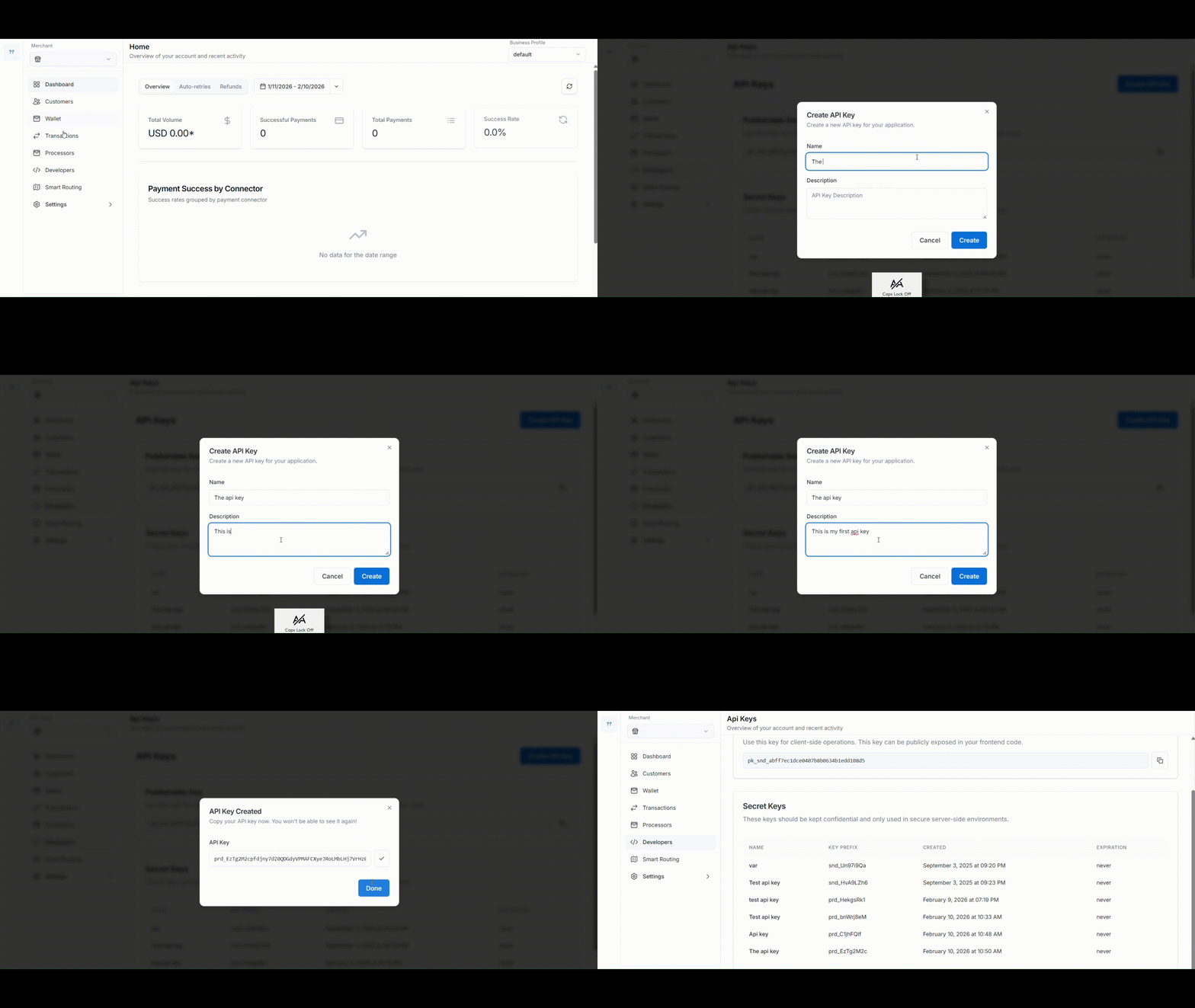 An API key will be created with options to download or copy it.